How to Calculate Usable NAS Storage: RAID 1, 5, 6 & 10 With Real Drive Examples
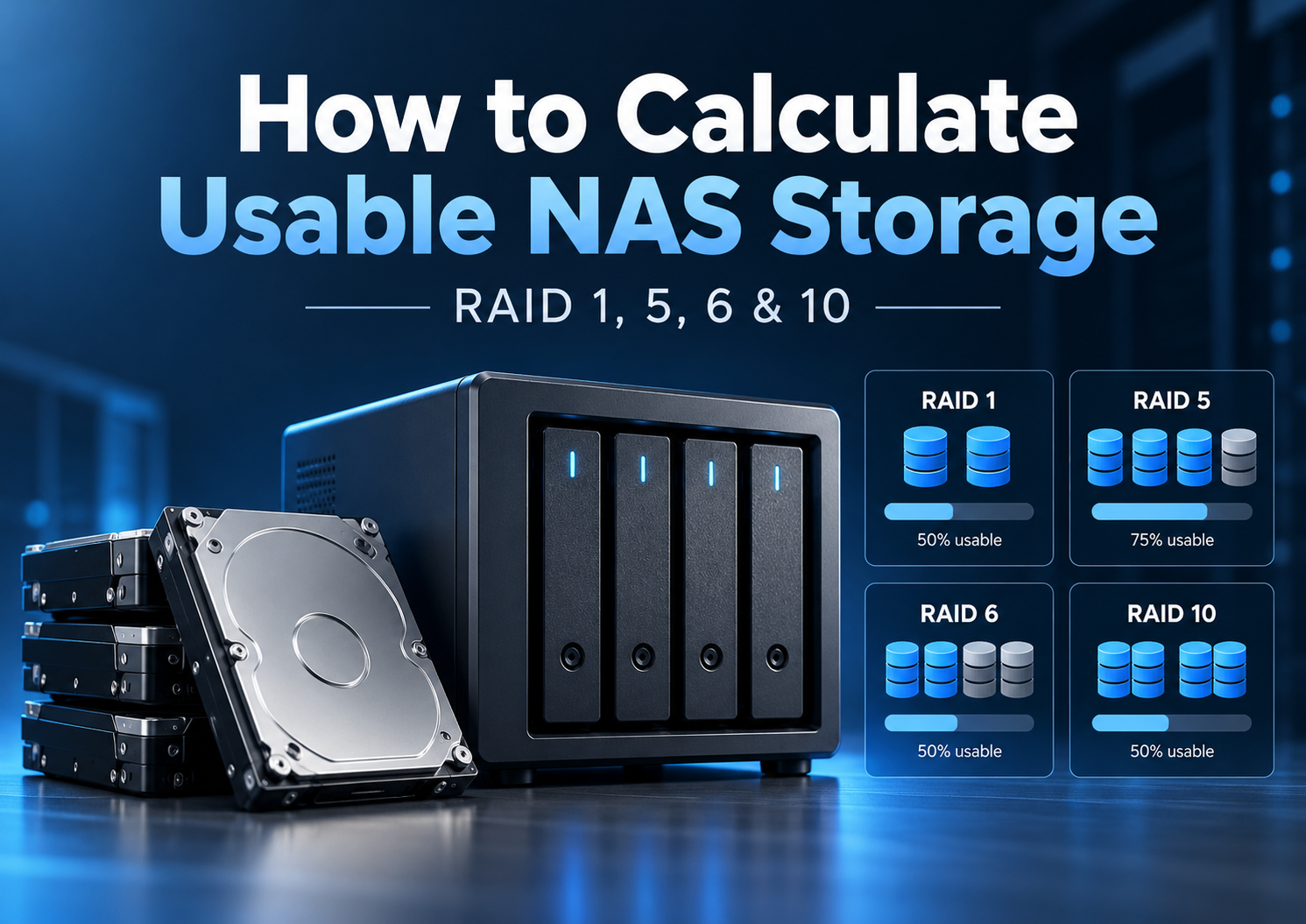
Quick answer: Start with the total advertised capacity of your drives, then subtract the capacity reserved for RAID parity or mirroring. Four 12TB drives in RAID 5 offer 48TB raw, 36TB nominal RAID-usable capacity, or about 32.74TiB before system and filesystem overhead. The NAS may report less space available for files.
That distinction matters before you buy drives. Four 12TB disks do not automatically give you 48TB of protected storage. The RAID layout, reporting units, filesystem and NAS implementation all affect what you can use. Run your configuration through the RAID & NAS Capacity Calculator, then use the worked examples below to understand the result.
Four different meanings of NAS capacity
| Measure | What it means | 4 × 12TB RAID 5 |
|---|---|---|
| Raw capacity | Sum of drive labels | 48TB |
| Nominal RAID-usable | After parity or mirroring cost | 36TB |
| Pool or volume capacity | After platform-specific reservations and configuration limits | Varies |
| Available for files | After filesystem metadata and existing space consumption | Varies |
These numbers should not be treated as interchangeable. Also, converting TB to TiB does not remove bytes: it changes the unit in which the same storage is expressed.
RAID capacity formulas at a glance
For standard equal-sized active member disks, let N be the number of disks and S be the size of one disk.
| Layout | Minimum drives | Nominal capacity | Failures tolerated |
|---|---|---|---|
| RAID 1, two-drive mirror | 2 | S | One |
| RAID 5 | 3 | (N − 1) × S | One |
| RAID 6 | 4 | (N − 2) × S | Two |
| RAID 10 | 4, even number | (N ÷ 2) × S | One per mirror pair; failure locations matter |
The RAID 1 formula here describes a typical two-drive mirror; systems can implement mirrors with more copies. RAID 5 and RAID 6 parity is distributed across the array, not stored on one permanently designated disk. RAID 10 can survive multiple failures only when no mirror pair loses both of its members. For choosing among layouts, read RAID 1 vs RAID 5 vs RAID 6 vs RAID 10.
TB vs TiB: why a NAS reports a smaller number
A manufacturer’s terabyte (TB) is 1,000,000,000,000 bytes. A tebibyte (TiB) is 1,099,511,627,776 bytes. Thus 36TB equals approximately 32.74TiB. This is not a second storage deduction. Some NAS interfaces use binary calculations while labeling the resulting figure “TB,” so always check how a platform defines its units.
| Decimal capacity | Binary equivalent |
|---|---|
| 12TB | 10.91TiB |
| 24TB | 21.83TiB |
| 32TB | 29.10TiB |
| 36TB | 32.74TiB |
| 40TB | 36.38TiB |
| 48TB | 43.66TiB |
Example 1: two 12TB drives in RAID 1
Raw: 24TB. Nominal RAID-usable: 12TB, approximately 10.91TiB. Efficiency: 50%. Each drive holds a mirror of the same data, so either member can fail without immediately making the mirrored data unavailable.
A mirror is straightforward for home file sharing and device backups, but its capacity is limited to one member’s size. Before buying a two-bay enclosure, ask whether that capacity accommodates planned growth. The 2-Bay vs 4-Bay NAS guide examines the trade-off; the 2-bay NAS guide covers hardware choices.
Example 2: four 12TB drives in RAID 5
Raw: 4 × 12TB = 48TB. Distributed-parity cost: one 12TB drive-equivalent. Nominal RAID-usable: (4 − 1) × 12TB = 36TB, approximately 32.74TiB. Efficiency: 75%. RAID 5 can tolerate any one active disk failure.
No single physical disk is exclusively assigned to parity. The term “one drive-equivalent” refers to the aggregate capacity consumed by parity distributed across members. If a drive fails, the array operates in a degraded condition until redundancy is restored; a further member failure during that period can cause array failure. The capacity calculator uses this configuration as its default example.
Example 3: four 16TB drives in RAID 6
Raw: 64TB. Parity cost: two 16TB drive-equivalents. Nominal RAID-usable: (4 − 2) × 16TB = 32TB, approximately 29.10TiB. Efficiency: 50%. RAID 6 can tolerate any two member failures.
RAID 6 has a substantial capacity cost in a four-drive group. That cost can be justified when retaining an additional layer of drive-failure tolerance matters more than maximizing nominal capacity. It does not remove the need for a backup.
Whether the additional parity is worthwhile depends on more than the amount of storage it consumes. Drive-failure tolerance, rebuild exposure, backup arrangements, and acceptable downtime all influence the decision. For a detailed comparison, see RAID 5 vs RAID 6 for a NAS: Capacity, Rebuild Risk and When Each Makes Sense.
Example 4: four 20TB drives in RAID 10
Raw: 80TB. Nominal RAID-usable: 40TB, approximately 36.38TiB. Efficiency: 50%. Two mirrored pairs are striped together. This can suit certain latency-sensitive or write-intensive workloads, but the fault-tolerance explanation must be precise.
A single member failure is tolerable. Two failed disks can be tolerable if they are in different mirror pairs. If both disks belonging to one mirror pair fail, the array can fail. RAID 10 should not be described simply as having guaranteed two-disk tolerance.
Same drives, different layouts
| Four 12TB disks | Raw | Nominal usable | Efficiency |
|---|---|---|---|
| RAID 5 | 48TB | 36TB | 75% |
| RAID 6 | 48TB | 24TB | 50% |
| RAID 10 | 48TB | 24TB | 50% |
Identical capacity does not mean identical protection or performance. RAID 6 can tolerate any two failed disks; RAID 10’s tolerance depends on which mirror pairs are affected. Selecting RAID solely on the nominal usable number is a mistake.
Why six bays change the calculation
With six 12TB disks, the raw total is 72TB. RAID 5 yields 60TB nominal (83.3% efficiency); RAID 6 yields 48TB (66.7%); RAID 10 yields 36TB (50%). As the active drive count increases, the one- or two-drive-equivalent parity cost accounts for a smaller share of the total. A bigger chassis and additional drives also cost more, so better capacity efficiency does not automatically mean better value.
Why your NAS can show less than these figures
The tables describe nominal capacity at the RAID layer. What you can store in a real NAS can be lower for several separate reasons:
- System and swap partitions: the NAS may reserve space on its members before or alongside pool creation.
- Filesystem structures: allocation metadata and other bookkeeping consume space.
- Pool and volume setup: some space may be unallocated, and single-volume limits can constrain how large a volume can be even if the pool is larger.
- Snapshots, apps and existing files: these reduce free space available for new files.
- Display units: decimal TB and binary TiB give different-looking figures for the same bytes.
Synology’s official RAID calculator notes that its systems reserve approximately 10GB per disk for system and swap partitions and specifies 4% volume metadata reservation for Btrfs or 2% for ext4. Those are Synology-specific figures, not universal subtractions that can be applied to QNAP, UGREEN, ASUSTOR or TrueNAS. Exact storage pools and volumes should be checked in the intended NAS manufacturer’s tools.
There is a related limit easy to miss when planning large arrays: the maximum size of one volume is not necessarily the maximum size of the storage pool. Some NAS models impose limits based on hardware or software. A 100TB-plus pool therefore does not automatically guarantee that you can create one volume of that size.
What happens when drive sizes do not match?
In many traditional RAID groups, each active disk is limited to the size of the smallest disk. For example, with 8TB + 8TB + 12TB in RAID 5, the nominal RAID result is (3 − 1) × 8TB = 16TB. The 12TB member has approximately 4TB beyond the size usable by that equal-width array. The group also uses one 8TB drive-equivalent for parity.
This is a traditional RAID calculation, not a universal rule for every vendor’s flexible storage system. Synology Hybrid RAID (SHR) and SHR-2 can sometimes combine matched portions of differently sized disks to make better use of capacity. However, SHR cannot make unmatched excess space protected by itself; mixed layouts may still leave unused capacity. For detailed upgrade decisions, see Can You Mix Hard Drive Brands, Models or Capacities in a NAS?.
Does a hot spare increase RAID capacity?
No. A hot spare is a standby disk, not an active member storing ordinary RAID data. A five-bay NAS with four active 12TB disks in RAID 5 and a fifth 12TB disk assigned as a hot spare still has 36TB nominal RAID-usable. The spare can automatically replace a failed member and begin rebuilding when supported. It does not turn RAID 5 into RAID 6 or add a second active parity layer.
Does this math also apply to ZFS RAIDZ?
Not exactly. RAIDZ1 and RAIDZ2 have broadly similar single- and double-parity planning relationships, but ZFS has its own allocation, padding, metadata and record-size behaviors. OpenZFS documents the simple parity estimate as approximate, not a guaranteed number of file-available bytes. Use ZFS-aware capacity planning for TrueNAS or another ZFS deployment rather than treating these tables as an exact RAIDZ output.
Plan for growth before choosing a NAS
Suppose you already store 16TB and expect another 3TB per year for three years. Your projected data becomes 25TB before considering snapshots, temporary space, system reservations or any forecasting error. A 24TB nominal array cannot meet that target. A 36TB nominal RAID layout offers more room, although you must still check its actual volume capacity and your workload.
There is no universally correct free-space percentage for every filesystem and workload. What matters is that your projected files do not fill the array’s theoretical maximum on day one. Start with the NAS storage planning guide, then test realistic configurations instead of buying based on a drive-label total.
Calculating RAID capacity is only part of storage planning. You also need enough free space for snapshots, temporary files, ongoing data growth, and system operations.
For practical examples of how to determine that reserve, see How Much Free Space Should You Leave on a NAS?.
RAID protection is not a backup
RAID 1, 5, 6 and 10 can help a system stay operational through certain disk failures. They do not independently protect files from accidental deletion, ransomware, corruption, fire, theft, or a failed NAS. Keep a separate recoverable backup and test that it can actually be restored. The storage needed for backups is a separate planning question from the usable capacity of your active RAID array.
From calculation to a practical hardware choice
First use the RAID & NAS Capacity Calculator to test the disk size, drive count and protection level. If a two-drive mirror suits your expected data, consider the 2-bay NAS options. If parity or more room for expansion matters, review the 4-bay NAS options and NAS device database.
Then compare hard drives by exact model, workload class, capacity and other specifications. Drive count and capacity alone do not establish compatibility. Confirm that your intended exact drive models are supported under the NAS manufacturer’s current guidance before placing an order.
Frequently asked questions
Why does my NAS show less capacity than the drive labels add up to?
The labels describe raw capacity. RAID redundancy, reporting units, platform reservations and volume/filesystem use all affect the numbers the NAS shows. Work through each layer rather than attributing the difference to one cause.
Why does a 12TB drive show about 10.9TiB?
12 decimal TB equals approximately 10.91 binary TiB. It is the same quantity of bytes expressed in two units.
How much usable capacity do four 12TB drives provide in RAID 5?
48TB raw becomes 36TB nominal RAID-usable, or about 32.74TiB, before NAS-specific overhead.
Why does RAID 5 use one drive-equivalent of capacity?
Distributed parity across the group consumes capacity equivalent to one equal-sized member. There is no dedicated disk that permanently holds all the parity.
Why does RAID 6 use two drive-equivalents?
Its dual distributed parity enables tolerance of two member failures at a cost equivalent to two drives in a standard equal-drive RAID 6 group.
Why does RAID 10 provide only about half of raw capacity?
Because the data is mirrored across pairs before striping. Each pair contributes approximately one member’s capacity.
Can I mix different drive sizes without wasting space?
Traditional RAID usually limits larger members to the smallest member’s capacity. Flexible implementations such as SHR may use certain combinations more efficiently, depending on how protection can be arranged.
Why can SHR still show unused space?
Excess capacity may lack enough matching space elsewhere to maintain the chosen redundancy, so it cannot yet be added to the protected pool.
Does a hot spare count toward usable capacity?
No. It is standby hardware outside the active group’s normal storage capacity.
Is nominal RAID-usable capacity the same as space available for files?
No. The final free space depends on system reservations, volume setup, filesystem metadata, existing files and snapshots.
Technical references
- QNAP: RAID type comparison — standard layouts, capacity and tolerance.
- Synology: RAID Calculator — platform overhead and mixed-drive guidance.
- NIST: Binary prefixes — TB and TiB units.
- OpenZFS: RAIDZ — parity estimates and implementation-specific space efficiency.